Shorten in place
In a meeting you organize or an email you write, the "Shorten Teams link" button swaps the long join link for a short one. Title, meeting ID and passcode stay as they are.
One click in your meeting invite: the long Teams join link becomes a short msteams.link link, formatting kept. Free, no account needed.
Works in Outlook on the web, the new Outlook for Windows, Outlook for Mac and classic Outlook (Microsoft 365).
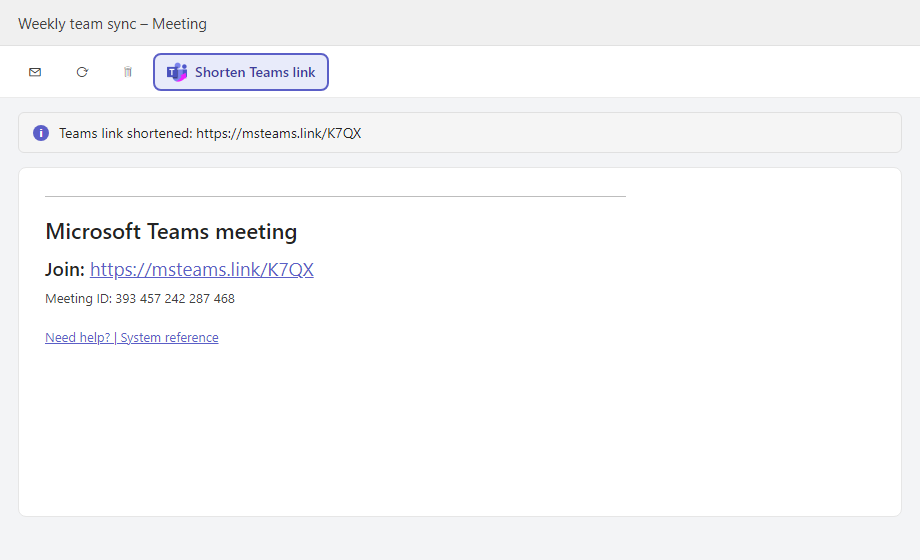
No browser extension needed: it lives in the Outlook ribbon, on every computer where you use Outlook.
In a meeting you organize or an email you write, the "Shorten Teams link" button swaps the long join link for a short one. Title, meeting ID and passcode stay as they are.
On a received invite or email, get a short link to share by SMS or chat in one click, even when Microsoft Safe Links rewrote the original link.
Only the visible join link changes. The "System reference" link that Teams Rooms read to join in one touch is left untouched.
Installed once per account: it then shows up in every Outlook where you sign in.
https://msteams.link/outlook-addin/manifest.xml
Download the manifest
Only the visible join link in the invite text is replaced by a short link that opens the same meeting. Meeting ID, passcode and the system reference link are kept.
Teams adds the join link when the meeting is saved. Save the meeting, then click the button again.
It is free and works without an account. Sign in on msteams.link if you want to keep your links and see click stats.
The add-in works inside Outlook itself, on Windows, Mac and the web, without Chrome. The Chrome extension is handy if you work in Teams and Outlook web in Chrome.
Chrome extension | How to copy a Teams link | Shorten a link now